



If you have move from Microsoft Word 2003 to Word 2007 recently, you may be at a loss. Even participants who have been using Word 2007 for some time still get stuck at times trying to find one of these commends that they don't use often (such as "Send for Review" to easily e-mail a document to someone else to review it).
The answer is actually pretty simple. It is nicely packaged in an interactive guide that is part of the Microsoft Office Online help. Here are the steps on how to get there:
- Click on the help button in Word 2007 (little question mark on the top right area)
Search for "Word 2003 to Word 2007" - One of the results that appear will be "Interactive: Word 2003 to Word 2007 command reference guide"
- Click on this reference guide to get it started
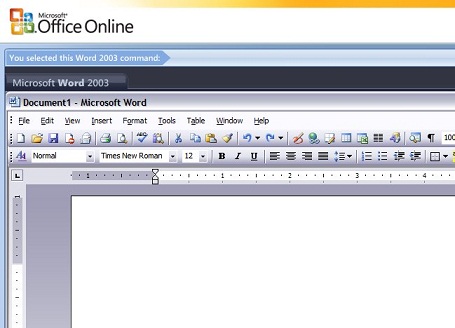
- Once is starts, you will see the Word 2003 familiar user interface
- Then you will be able to click on a menu item, and get the immediate answer as to where this command is in Word 2007
This is what the guide will look like, ready for you to indicate which comand you want help with:
Your Turn: Find where the "Send for Review" is and put your answer below!