


 We get this question often which makes perfect sense. After all, if you are using Microsoft Outlook, and have the benefits of the Outlook Calendar, doesn't make sense to want to view your SharePoint Calendar events in the same Calendar and not have to go to SharePoint to manage these events?
The answer is yes you can view your Microsoft SharePoint Calendar events in your Outlook Calendar and it is simple to set that up. Below are the steps that are involved in connecting your SharePoint Calendar to your Outlook Calendar, however, keep in mind that if you are using Outlook 2003, this would be a one way connection. You will be able to view the events but not edit them or add new events. However if you are using the Microsoft Office 2007 suite of applications, you will be able to make updates in Outlook 2007 and these updates will show up in SharePoint.
Here is the process of connecting your Microsoft SharePoint Calendar to your Outlook Calendar
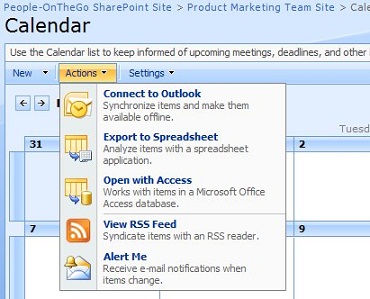
From your SharePoint Calendar, select Action, and then select Connect to Outlook
As soon as you do so, you will be prompted for your user name and password and a new calendar will be created in Outlook:
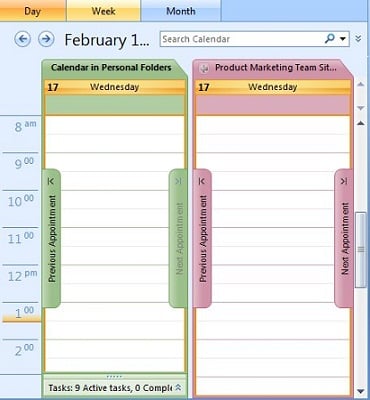
And now you can view this Calendar in Outlook and if you are using Microsoft Office 2007, you will be able to update it from Outlook.
More Resources
- The complimentary lunch & learn webinar (Microsoft SharePoint Tips)
- The upcoming Microsoft SharePoint Techniques workshop
- The upcoming Managing and Organizing Your E-mail Inbox workshop
- 3 ways to get rid of e-mail--Using Microsoft SharePoint
- Question and Answer: When should I use Microsoft SharePoint and when should I use a wiki?