


E-mail overload! We all complain about it, but many of us are addicted to it, and the question remains whether we are taking the necessary steps to reduce it. Microsoft SharePoint can help tremendously reduce the e-mail overload and just as importantly enable information sharing, allowing us to harness the collective knowledge within our team and organization instead of keeping this knowledge buried in people's mailboxes.
Here are 3 ways in which Microsoft SharePoint can help!
First: Managing documents in Microsoft SharePoint
It is so easy to e-mail documents, and no wonder that most of us do it. The question I always ask in our Microsoft SharePoint workshop is "if you have a team of 5 people, and you are creating a marketing plan for instance, and you go through 10 revisions to finalize the document, how many copies of this document will be in your inboxes by the time you are done?"
The answer is anywhere between 50 and several hundreds. However, the more serious implication of e-mail documents is the confusion that is likely to happen when people aren't sure who has the latest version, who changed what, and not to mention the utter chaos that happens when two different "branches" of the same document are accidentally created.
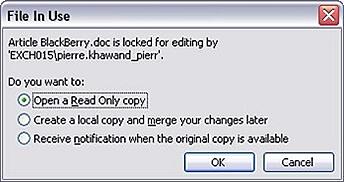
With Microsoft SharePoint, the document can reside in a document library, and everyone has access to the same version. A revision history is automatically maintained for future reference. And when multiple people attempt at editing the same document at the same time, the second person will be gently notified and prompted to take one of the following actions:
Second: Managing meetings in Microsoft SharePoint
"Who has the latest agenda? Did you add my agenda item? What happened to the design document that I sent out to everyone before the meeting? When are you going to send the meeting notes?"
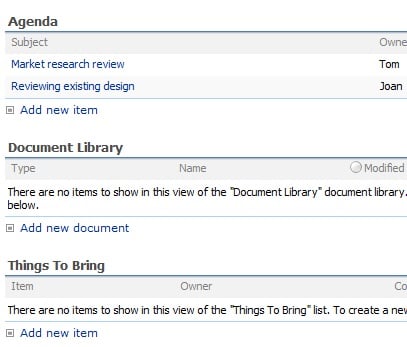
These are only a few of the questions that come up when managing meetings via e-mail. Meetings and meeting workspaces in SharePoint allow us to have one central repository and again, it is not just about storing information, it is also the collaboration aspect. Everyone involved can contribute to the agenda to the background material, and follow-up material; all happening smoothly and in real time!
This is some of the information that the meeting workspace can hold:
Third: Managing tasks in Microsoft SharePoint
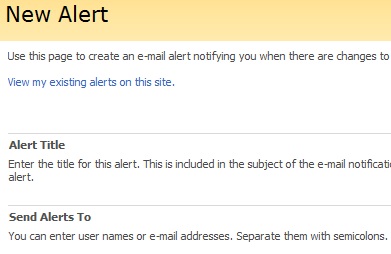
This is especially useful for tasks that involve multiple people; where each person contributes their part and then hand over the task to the next person. Managing such tasks in Microsoft SharePoint keeps everyone informed and up-to-date at all times. And coupling this with the alerts capability, each person can be notified as soon as a task is assigned to them.
Alerts are easy to setup in SharePoint:
Additional Resources
- Microsoft SharePoint Techniques workshop
- Emerging Collaboration Technologies: Blogs, Wikis, and Microsoft SharePoint
- Microsoft SharePoint 2010 in Action, lunch & learn on June 23, 2011 (details coming soon)