




Guest blog article by Steve Loosley, Tech Blogger
In our first post, we said that a Google Chromebook is a fast, secure notebook computer that runs a Chrome web browser.
In this post, let’s contrast a traditional computer, whether Windows, Mac, or Linux, with the new Chromebook.
Overview: where's the action?
Data Storage. On a traditional computer, the data, whether documents, spreadsheets, images, or MP3 files, is stored on your computer. On a Chromebook, the data is stored on the web, or as one person commented, "Google Docs is your hard drive."
Applications. On a traditional computer, you install and run applications on your computer. On a Chromebook, the only application that runs on your computer is a web browser. All other applications run on the web.
Maintenance. On a traditional computer, you maintain the software, and you backup your data. On a Chromebook, you sign-in and the web does the rest. The web updates your Chromebook, maintains your applications, and stores and protects your data.
iCloud vs. Chrombooks
If you have an iPhone or Mac, you may be familiar with iCloud. iCloud keeps your data in-sync on your Apple mobile devices. iCloud does not make a Mac into a "cloud computer"; you must download documents to your hard drive in order to edit them. You cannot edit iCloud documents in a web browser, nor can you collaborate or share them with others. On a Chromebook, the data resides in the cloud where it can be viewed, edited, shared, and stored.
SkyDrive vs. Chromebooks
Microsoft's SkyDrive is similar to Google Docs; documents can be created and edited in a browser, and stored on the web. SkyDrive, however, differs from Google Docs, because documents can also be downloaded and edited in Microsoft Office on a user's computer. SkyDrive can also sync data stored in the cloud across multiple Windows devices. A Windows computer can function as a Chromebook-like cloud-computer, but fundamentally, it's a traditional computer.
Security: is the web safe?
An interlocutor would relish the chance to ruin our fun by asking, “What about security? You want me to store my data on the web? Ha! Not a chance!”
Chromebooks use the principle of “defense in depth,” claims Google. Through sandboxing, verified boot, data encryption, recovery, and guest mode, Chromebooks are designed to be more secure than your present computer.
Hardware: who makes Chromebooks?
Two vendors offer Chromebooks, Samsung and Acer, and both are similarly spec’d:
- dual-core Intel Atom N570 processor
- 2 GB RAM
- 16 GB SSD
- screen size - 12.1 in (Samsung) or 11.6 in (Acer)
- full-size keyboard
- WiFi only or WiFi + 3G
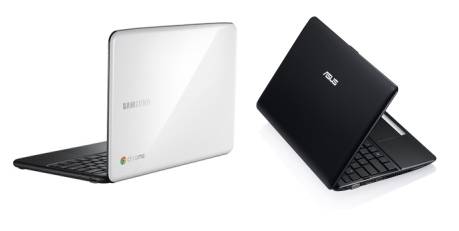
Chromebooks cost $300 to $500. Education and business users can lease Chromebooks for around $28 per month, which includes updates, tech support, and hardware replacements.
Do you think that a Chromebook would work for you? Please share your thoughts in the comments below.
Additional Resources
Google Chromebooks - Google Chromebook Website
Accomplishing More Virtually-in Second Life - Upcoming Popular People-OnTheGo webinar
People-OnTheGo Complete Webinars Schedule and Registration (Q4, 2011)