



Less Is More Blog Productivity Tips

Order your electronic copy of the survey report ($19.95 for a limited time)

Social Media Survey Report

The survey about the use of e-mail and Social Media has been completed and the survey report is now available. Learn more and order your copy!

Download Free eBook

The Results Curve(tm): How to Manage Focused and Collaborative Time.

Download now 

Join our Free Webinars

Less-is-more Blog by Pierre Khawand

Current Articles | RSS Feed RSS Feed

Google+ Learn how to set-up Circles.


Guest blog article written by Steve Loosley, Tech Blogger

Google+ is about sharing information with different circles or groups of people. In our last post, we learned how to set-up our G+ account and update our Profile. Today, we want to introduce Circles.

All of us have a variety of relationships or “circles” of people with whom we interact — family, classmates, colleagues, associates, customers, and so forth. Google+ allows us to create our own Circles, giving us the power to share different things with different circles of people.

Set-up a Circle

Log in to your account and click on the icon at the top of your screen that resembles two Olympic rings with a third ring dislodged.

g circles 1

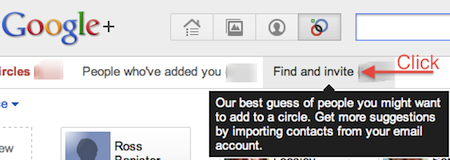
At the top of the next screen, you will see three categories of people, “People in your circles,” “People who’ve added you” to their circles, and people to “Find and Invite.”

Click on Find and Invite.
g circles 3


Google+ will suggest people you may want to add. You can either add someone yourself by clicking on the blank card in the upper left titled, “+ Add a new person,” or you can search by entering a name in the box at the top of your screen, “Find People.”

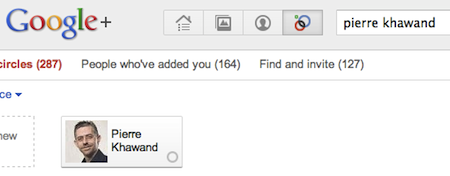
To practice, let’s create a new Circle titled Business Contacts, and add Pierre Khawand, the founder of People-OntheGo to the Circle. In the search box at the top, type Pierre Khawand and press Enter. A card with Pierre’s picture will appear. 
g circles 2

Next, drag and drop his card in the gray, dashed circle on the far left titled, “Drop here to create a new circle.” Next, click the blue link, Create circle.

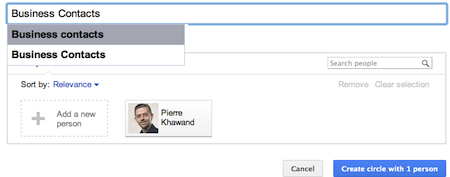
A pop-up will ask you to enter a description for the Circle. Type “Business Contacts,” and click the blue box, Create circle with one person

g circles 4

Congratulations! You have created your first Circle and are well on your way to leveraging the power of Google+.

If you would like an invitation to join G+, please leave a comment below, note your interest, and we’ll do our best to make sure that you receive an invitation email as soon as possible.

Additional Resources

Accomplishing More With Social Media Webinar Series: 9/19, 9/26 (12:00 to 1:30 pm Pacific Time)

LinkedIn for Sales Professionals! Webinar: 8/5 and 10/14 (9:30 am to 11:00 am Pacific Time)

Google+ Project Website

Comments

Leave it to you, Pierre, to once again put technology that I'm avoiding into simple terms I can explain...by doing so, you do a great job of helping me be EFFICIENT in exploring this new tool and deciding whether to pursue it and making it easy to do so...thx to both you and Steve for the great info! Now..am I sure I'll be jumping into Google+ right away...not sold quite yet, but I can feel it coming!
Posted @ Thursday, August 04, 2011 8:15 AM by Jen Berkley Jackson
I had no idea about this feature. Thanks for sharing!
Posted @ Thursday, August 04, 2011 11:59 AM by Colleen
How much time do people spend on all these networking sites? I have facebook, Linked-In, and twitter. I read an online newspaper and several blogs but I also work full time, belong to a few organizations, do volunteer work, and have family. Where do people find time to keep up with all these new communications technologies? I log into facebook about once a week, Linked-In less often, and check my emails about once a day, most days.
Posted @ Thursday, August 04, 2011 2:11 PM by Al
Al, I love your comment! I often wonder the same, "Where do people find the time?" On some days, it seems that I never get anything done anymore.  
 
If I could make a shameless plug for Pierre and People-OntheGo, personally, I have found his workshops and books very helpful. Pierre has helped me navigate through these very challenges.
Posted @ Thursday, August 04, 2011 3:29 PM by Steve Loosley
I'm not seeing thefeatures to let me show certain material to celected circles or to only have my five imptrant circles on my stream
Posted @ Thursday, August 04, 2011 5:37 PM by J Flack
Thank you Steve, Al, and all for joining the conversation, and yes! how do we find time for all this social media stuff? I have three reminders for those who have been following our less-is-more articles, one is the 80/20 rule, second is the Results Curve, and third is know who to follow and what for! Let us keep the conversation going! 
 
J, in the left column in Google+ under your photo, you should see the different circles, and if you click on a circle, this will filter your stream to display only the stream from the selected circle!
Posted @ Thursday, August 04, 2011 6:18 PM by Pierre Khawand
OK thanks... would have been nice if I could have just picked ny 4-5 favorite circles. 
 
So how do I select circles when I want to post something?
Posted @ Thursday, August 04, 2011 6:35 PM by J Flack
J, enter what you want to share in the box below Stream that says "Share what's new..." Just below this box, you select who you want to share with. Click on the blue area that says, "+Add circles or people to share with..." and then select a circle or individual people.
Posted @ Thursday, August 04, 2011 7:40 PM by Steve Loosley
http://www.tswk.org/index.php?option=com_datsogallery&Itemid=0&func=detail&catid=2&id=25&mosmsg=%C2%E0%F8+%EA%EE%EC%EC%E5%ED%F2%E0%F0%E8%E9+%F3%F1%EF%E5%F8%ED%EE+%F1%EE%F5%F0%E0%ED%E5%ED. 
Posted @ Monday, November 21, 2011 3:22 AM by ss
Post Comment
Name
 *
Email
 *
Website (optional)
Comment
 *

Allowed tags: <a> link, <b> bold, <i> italics

Subscribe by Email

Your email:

Write your comments!

We want to hear from you. Please write your comments in the blog and let us know what you think. We are eagerly awaiting your insights, tips, and suggestions!