



Less Is More Blog Productivity Tips

Order your electronic copy of the survey report ($19.95 for a limited time)

Social Media Survey Report

The survey about the use of e-mail and Social Media has been completed and the survey report is now available. Learn more and order your copy!

Download Free eBook

The Results Curve(tm): How to Manage Focused and Collaborative Time.

Download now 

Join our Free Webinars

Less-is-more Blog by Pierre Khawand

Current Articles | RSS Feed RSS Feed

Google+ We'll help you configure Notifications


Guest blog article written by Steve Loosley, Tech Blogger

When others share with you, you want to know about it, but notifications can be disruptive. Fortunately, Google+ allows us to customize notifications.

Let’s set-up your notification preferences.

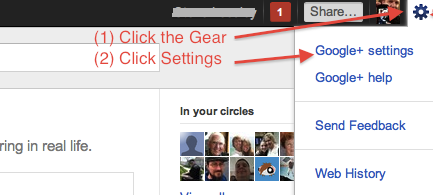
Click the small sprocket or gear icon in the upper right corner of your G+ screen. In the drop-down box, click Google+ settings

g privacy 1


You will land on a page that allows you to set your delivery or notification preferences. You can receive notifications by (1) email; (2) SMS text messages; and (3) in the Google+ bar.

G+ allows you to customize numerous events, such as when you’re tagged in a photo, have a post shared with you, or are added to a circle. G+ even provides for notices when others comment about you in photos.

As you can see in the screenshot below, I turned off all of the notifications except “Shares a post directly with me.” A direct share is similar to an email, so I want to make sure that I do not overlook something shared only with me. 
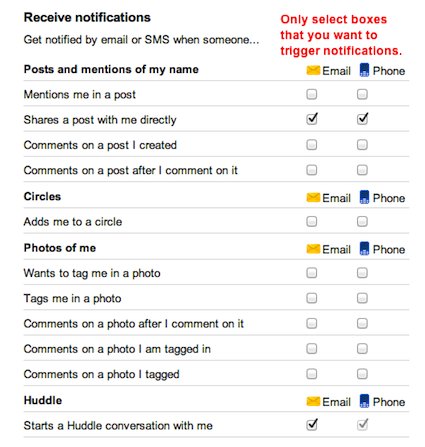
g notifications

Even though I have most notifications turned off, the Google+ bar still notifies me about all events. The Google+ bar is the black bar at the top of your web browser. On the far right, you will see your name, followed by a small box with a number. The box turns red when you have unread notifications.
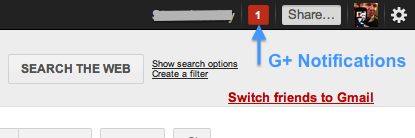
g notifications 3 

Click the notification box, even if it’s grayed out with the number 0, indicating that you have no unread notifications. A live screen will drop down with a list of your notifications. You can navigate through this list and even comment, just as you would in your main web browser.
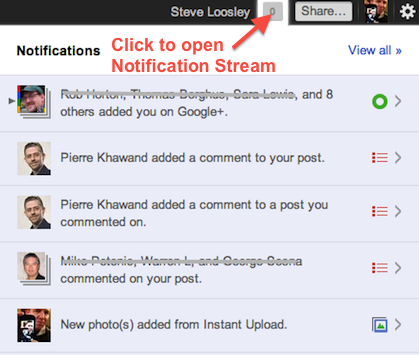
g notifications 4

Google+ enables you to tailor notifications, and from the G+ toolbar, you can interact with your stream quickly and efficiently.

If you would like an invitation to join G+, please leave a comment below, note your interest, and we’ll do our best to make sure that you receive an invitation email as soon as possible.

Additional Resources

Google+ Project Website 

Google+ Help Articles on Notifications 

Accomplishing More With Social Media Webinar Series: 9/19, 9/26 (12:00 to 1:30 pm Pacific Time)

LinkedIn for Sales Professionals! Webinar: 8/5 and 10/14 (9:30 am to 11:00 am Pacific Time) 

Comments

How are people feeling about Facebook vs. Google+? I have both but am not completely sure Google+ is better. Do most people living in both worlds and double-posting? Just curious...
Posted @ Thursday, August 18, 2011 12:58 PM by Julie Reynolds
+Julie, excellent question/observation. In a subsequent post, we are going to compare and contrast G+, Facebook, and Twitter. While each has its strengths — and yes, many people double-post — I wonder if there's room for all three.  
 
If, for example, I want to view my daughter's pictures, I know that I need to coax her into sharing a Facebook link. Similarly, if I want to check about a Google Chromebook meet-up, then it's G+. Finally, for real-time streams from eye witnesses, then Twitter is unbeatable.  
 
Great question. What to you think?
Posted @ Thursday, August 18, 2011 2:58 PM by Steve Loosley
Just getting started with g+ and appreciate the tips.
Posted @ Thursday, August 18, 2011 8:22 PM by Fred schenkelberg
Here is an article that is relevent to Julie and Steve's comments above: 
 
Study: Will You Abandon Facebook in Favor of Google+? by Brian Solis 
 
http://www.briansolis.com/2011/08/study-will-you-abandon-facebook-in-favor-of-google/
Posted @ Friday, August 19, 2011 12:47 PM by Pierre Khawand
Post Comment
Name
 *
Email
 *
Website (optional)
Comment
 *

Allowed tags: <a> link, <b> bold, <i> italics

Subscribe by Email

Your email:

Write your comments!

We want to hear from you. Please write your comments in the blog and let us know what you think. We are eagerly awaiting your insights, tips, and suggestions!